Scrapers / Developer & File Tools

Website Image Downloader
hipersoft/website-image-downloader
Find and download every image on any web page or whole site: lazy-loaded, responsive (largest size), social-preview and CSS background images. Filter by size and format, skip duplicates, get direct file links plus one ZIP of everything.
Total users
2Monthly users
1Total runs
2Per image saved
$0.003Last rebuilt
Nov 3, 2026Overview
Website Image Downloader scans any web page — or a whole website — and downloads every image it finds: regular images, lazy-loaded images, the largest version of responsive images, social-preview images and CSS background images. Filter by size and format, skip duplicates automatically, and get a direct link to every file plus one ZIP of everything. Perfect for product photo collection, image datasets, competitor research, website migrations and backups.
What does the Website Image Downloader do?
Paste one or more page URLs. The downloader reads each page, collects every image it references, downloads them, and saves each file to your run storage with a metadata row: page, image URL, alt text, format, width, height, file size and SHA-256 hash. Turn on site crawling to follow links on the same website and collect images from many pages in one run. At the end you get images.zip — every saved image in a single download.
Why use it instead of a plain image downloader?
- No need to collect image links yourself — give it the page, it finds the images.
- Highest resolution by default — for responsive images it picks the largest size the page offers.
- Finds hidden images — lazy-loaded (
data-src),<picture>sources, Open Graph / Twitter card images and CSS backgrounds. - Clean results — minimum width/height, minimum file size and format filters drop icons, spacers and tracking pixels.
- No duplicates — identical images are saved once, even under different URLs.
- One ZIP — download everything at once, or use the per-file links.
What data do you get per image?
| Data point | Description |
|---|---|
| Where it was found | pageUrl, foundIn (img, srcset, lazy, picture, meta, css, link, icon) |
| Image | imageUrl, finalUrl, alt |
| File info | format, contentType, sizeBytes |
| Dimensions | width, height |
| Hash | sha256 |
| Saved file | fileName, fileUrl |
What you get
One row per saved image plus the files themselves and images.zip. Export the dataset to JSON, CSV, Excel or XML.
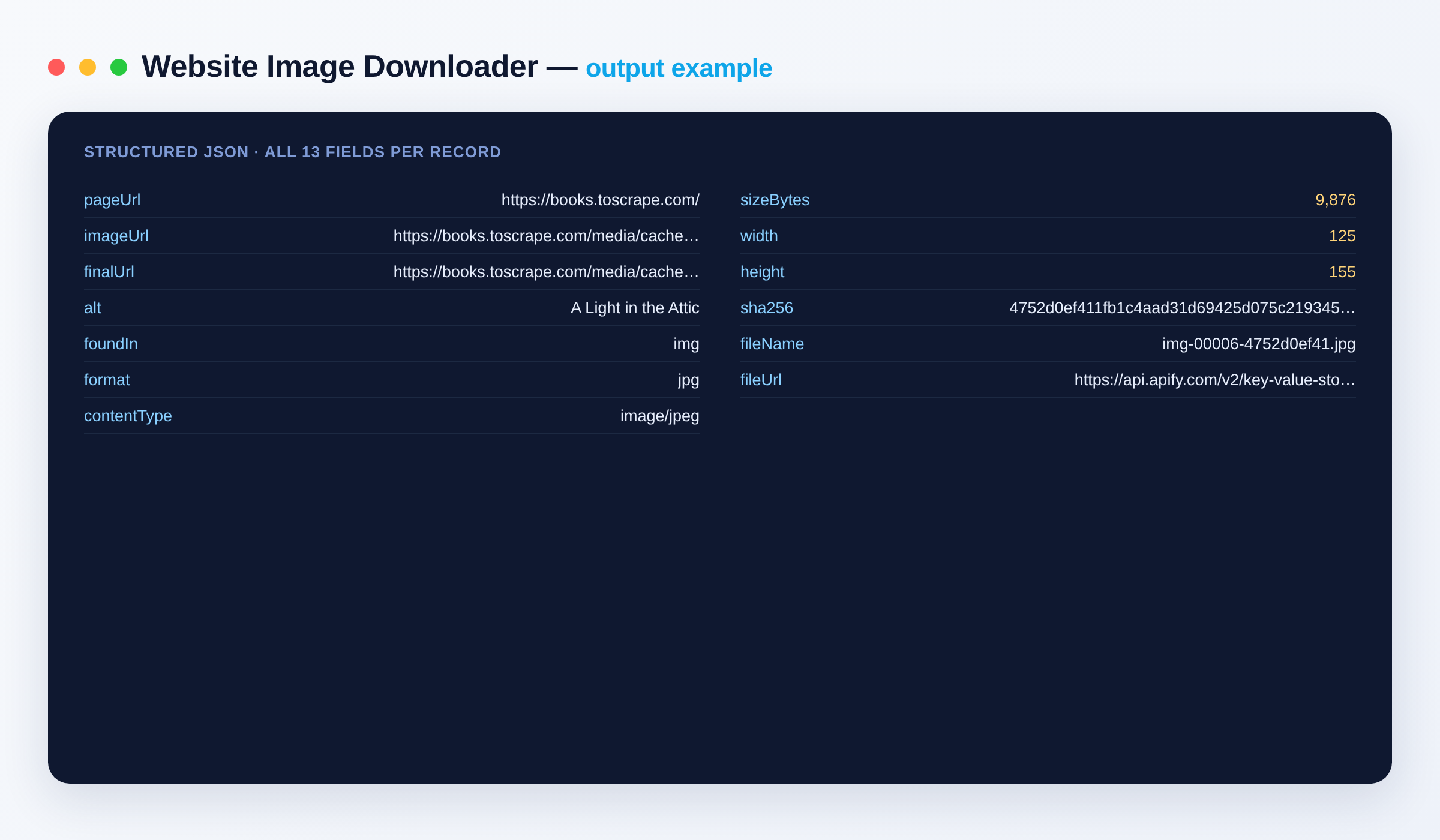
{
  "pageUrl": "https://books.toscrape.com/",
  "imageUrl": "https://books.toscrape.com/media/cache/2c/da/2cdad67c44b002e7ead0cc35693c0e8b.jpg",
  "finalUrl": "https://books.toscrape.com/media/cache/2c/da/2cdad67c44b002e7ead0cc35693c0e8b.jpg",
  "alt": "A Light in the Attic",
  "foundIn": "img",
  "format": "jpg",
  "contentType": "image/jpeg",
  "sizeBytes": 9876,
  "width": 125,
  "height": 155,
  "sha256": "4752d0ef411fb1c4aad31d69425d075c219345c386fd94f43ddfbf4495ea0437",
  "fileName": "00004-2cdad67c44b002e7ead0cc35693c0e8b.jpg",
  "fileUrl": "https://api.apify.com/v2/key-value-stores/<storeId>/records/00004-2cdad67c44b002e7ead0cc35693c0e8b.jpg"
}
Output schema
| Field | Type | Description |
|---|---|---|
pageUrl |
string (URL) | The page the image was found on. |
imageUrl |
string (URL) | The image address as referenced by the page. |
finalUrl |
string (URL) | The image address after redirects. |
alt |
string | The image's alt text, when the page provides one. |
foundIn |
string | Where on the page it was found: img, srcset, lazy, picture, meta, css, link or icon. |
format |
string | File format, e.g. jpg, png, webp, gif, svg, avif. |
contentType |
string | MIME type of the file. |
sizeBytes |
integer | File size in bytes. |
width |
integer | Width in pixels (read from the file). |
height |
integer | Height in pixels (read from the file). |
sha256 |
string | SHA-256 hash of the file contents. |
fileName |
string | Name of the saved file (also its name inside images.zip). |
fileUrl |
string (URL) | Direct download link to the saved file. |
The run's key-value store also holds images.zip (all saved images) and OUTPUT (run totals and the ZIP link).
Use cases
- E-commerce: collect all product photos from product or category pages.
- Machine learning: build image datasets from galleries and listings.
- Marketing & research: gather competitors' banners, ads and social-preview images.
- Website migrations & backups: download every image from an old site in one ZIP.
- SEO audits: list every image on a page with its size, dimensions and alt text.
How to download all images from a website
- Open the Website Image Downloader and paste one or more Page URLs.
- Optional: turn on Also scan linked pages on the same site and set Max pages.
- Optional: set Minimum width/height, Minimum file size or Only these formats to keep just the images you want.
- Click Start.
- Download images.zip from the run's Storage tab (or the Output tab), or use each row's
fileUrl.
Input
{
  "startUrls": [{ "url": "https://books.toscrape.com/" }],
  "crawlSameSite": true,
  "maxPages": 5,
  "maxImages": 100,
  "minWidth": 100,
  "formats": ["jpg", "png", "webp"],
  "createZip": true
}
| Field | Description |
|---|---|
startUrls |
Pages to scan. |
crawlSameSite |
Follow links on the same site and scan those pages too. |
maxPages |
Maximum pages to scan in total (default 10). |
maxImages |
Stop after saving this many images (default 200). |
minWidth / minHeight |
Skip images smaller than this many pixels. |
minBytes / maxBytes |
Skip files smaller / larger than this size. |
formats |
Keep only these formats (empty = all). |
skipDuplicates |
Save identical images once (default on). |
includeSrcset |
Take the largest responsive version (default on). |
includeMetaImages |
Include Open Graph / Twitter card images (default on). |
includeCssBackgrounds |
Include inline CSS background images (default on). |
includeIcons |
Include favicons and app icons (default off). |
storeFiles |
Save each image with a download link (default on). |
createZip |
Bundle everything into images.zip (default on, up to 400 MB). |
fileNaming |
page-index (numbered), original (original file name) or hash. |
proxyConfiguration |
Optional proxy for loading pages. |
Related tools
- Bulk Image Downloader — already have a list of image URLs? Download them all at scale.
- Image Optimizer — compress and resize images.
- Images to PDF — turn a set of images into one PDF.
- Website Content Crawler Pro — crawl a site into clean Markdown or text.
FAQ
Which images does it find?
Standard <img> images, lazy-loaded images (data-src and similar), responsive srcset and <picture> sources (largest size), Open Graph and Twitter card images, inline CSS backgrounds, links that point straight at image files and, optionally, favicons and app icons.
Can it download images from a whole website? Yes. Turn on Also scan linked pages on the same site and set Max pages. Images that repeat across pages are saved once.
How do I get all the images at once? Every run produces images.zip in the run's key-value store, linked from the Output tab and in the run summary.
Can I filter out icons and tiny images? Yes — set Minimum width, Minimum height or Minimum file size, or limit to certain formats.
What export formats are supported? The image list exports to JSON, CSV, Excel or XML; the images themselves are saved as files and in one ZIP.
How does billing work? You pay a small fee per page scanned and per image saved. If you set a maximum cost per run, the run stops cleanly at that limit and you only receive what you paid for. See the Pricing tab for current rates.
Can I connect this to other tools? Yes, through integrations on the Apify platform: Make, Zapier, Slack, Airbyte, GitHub, Google Drive and many more, plus the Apify API, JavaScript/Python clients and webhooks.
Is it legal to download images from websites? Only download images you have the right to use. You are responsible for respecting copyright and each site's terms.
Notes
Files are saved to your run's storage and are private to your account, as with all Apify runs. Only download images you have the right to use.
Input
| Field | Type | Description |
|---|---|---|
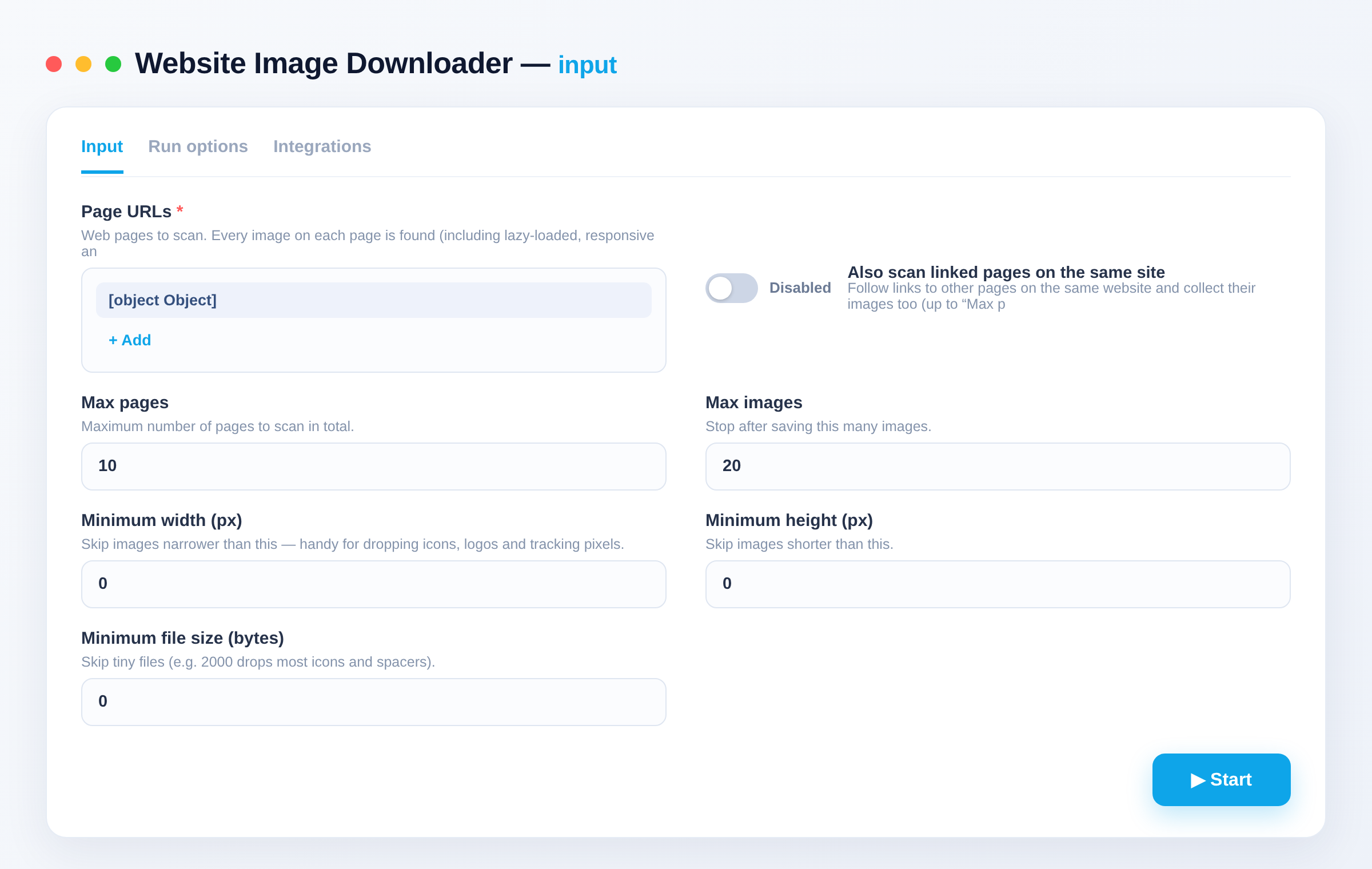
startUrls requiredPage URLs | array | Web pages to scan. Every image on each page is found (including lazy-loaded, responsive and social-preview images) and downloaded. |
crawlSameSiteAlso scan linked pages on the same site | boolean | Follow links to other pages on the same website and collect their images too (up to “Max pages”). Default: false |
maxPagesMax pages | integer | Maximum number of pages to scan in total. Default: 10 |
maxImagesMax images | integer | Stop after saving this many images. Default: 200 |
minWidthMinimum width (px) | integer | Skip images narrower than this — handy for dropping icons, logos and tracking pixels. Default: 0 |
minHeightMinimum height (px) | integer | Skip images shorter than this. Default: 0 |
minBytesMinimum file size (bytes) | integer | Skip tiny files (e.g. 2000 drops most icons and spacers). Default: 0 |
maxBytesMaximum file size (bytes) | integer | Skip files larger than this. Default: 25000000 |
formatsOnly these formats | array | Keep only these formats, e.g. jpg, png, webp, gif, svg, avif. Leave empty for all formats. |
skipDuplicatesSkip duplicate images | boolean | Images with identical content are saved once, even when they appear under different URLs. Default: true |
includeSrcsetPrefer the largest responsive version | boolean | For responsive images (srcset / ), take the highest-resolution version the page offers. Default: true |
includeMetaImagesInclude social-preview images | boolean | Also collect the page's Open Graph / Twitter card images. Default: true |
includeCssBackgroundsInclude CSS background images | boolean | Also collect images set as inline CSS backgrounds. Default: true |
includeIconsInclude favicons and app icons | boolean | Also collect the site's favicon and touch icons. Default: false |
storeFilesStore each image as a file | boolean | Save every image in the run's storage with a direct download link. Default: true |
createZipCreate one ZIP of all images | boolean | Bundle all saved images into a single images.zip download (up to 400 MB). Default: true |
fileNamingFile names | string · page-index, original, hash | How saved files are named. Default: "page-index" |
proxyConfigurationProxy | object | Optional proxy for loading pages. Images themselves are downloaded directly. Default: {"useApifyProxy": false} |
API
curl -X POST "https://api.apify.com/v2/acts/hipersoft~website-image-downloader/run-sync-get-dataset-items?token=$APIFY_TOKEN" \
  -H "Content-Type: application/json" \
  -d '{
  "startUrls": [
    {
      "url": "https://books.toscrape.com/"
    }
  ],
  "maxImages": 20
}'
from apify_client import ApifyClient
client = ApifyClient("YOUR_APIFY_TOKEN")
run = client.actor("hipersoft/website-image-downloader").call(run_input={
"startUrls": [
{
"url": "https://books.toscrape.com/"
}
],
"maxImages": 20
})
for item in client.dataset(run["defaultDatasetId"]).iterate_items():
print(item)import { ApifyClient } from 'apify-client';
const client = new ApifyClient({ token: 'YOUR_APIFY_TOKEN' });
const run = await client.actor('hipersoft/website-image-downloader').call({
"startUrls": [
{
"url": "https://books.toscrape.com/"
}
],
"maxImages": 20
});
const { items } = await client.dataset(run.defaultDatasetId).listItems();
console.log(items);Pricing
| Event | Price | Paid plans from |
|---|---|---|
| Image saved One image found on the page, downloaded and saved (with its file link and details). | $0.003 | $0.0015 |
| Page scanned One web page loaded and scanned for images. | $0.02 | $0.02 |
You pay only for what the run returns. Set a maximum cost per run and it stops cleanly at that limit.
Related scrapers
Bulk Image Downloader
Download thousands of images from a list of URLs and store each in the key-value store with a public link. Returns content type, size, dimensions and SHA-256 per image. Bulk-ready. Great for datasets, backups and media pipelines.
8,102 runs · 103 users · $0.056 / url processed
Text to Speech
Convert any text to natural-sounding speech as an MP3 download. 300+ premium neural voices across 70+ languages, adjustable rate, pitch and volume. Great for voiceovers, videos, accessibility and audio content. No setup.
278 runs · 22 users · $0.01 / audio generated
Google Maps Email Extractor
Search Google Maps for businesses, then crawl each business website to extract emails, social profiles and extra phone numbers. Turns any Maps search into a ready lead list. No setup.
159 runs · 8 users · $0.006 / business lead scraped
Website Screenshot
Capture full-page or viewport screenshots of any URL as PNG or JPEG, at any device size. For monitoring, previews, thumbnails and automation workflows.
156 runs · 3 users · $0.004 / screenshot captured
Bulk URL Status Checker
Check thousands of URLs over plain HTTP: status codes, broken links (404/410/5xx), full redirect chains, response time, content type, page title and SSL certificate expiry.
154 runs · 13 users · $0.002 / url checked
Google Search Scraper
Scrape Google Search results (organic listings) for any query: title, URL, displayed URL, snippet and position. Multi-query, per-country/language, pagination. Uses Google SERP proxy — reliable, no captcha, no setup.
121 runs · 8 users · $0.001 / result scrapedSend the site and the fields. We build it and you get it first.